Window always named
Never the foreground window by default; an ambiguous title or label is refused with the list of candidates.
 NexusWindows / for Antigravity
All editions
NexusWindows / for Antigravity
All editions
MCP SERVER · GOOGLE ANTIGRAVITY · GEMINI
Windows computer use for Antigravity, in the background.
An MCP server, nexus-computer, for Google Antigravity: Gemini sees and drives Windows applications while you keep the mouse, the keyboard and the foreground window.
For
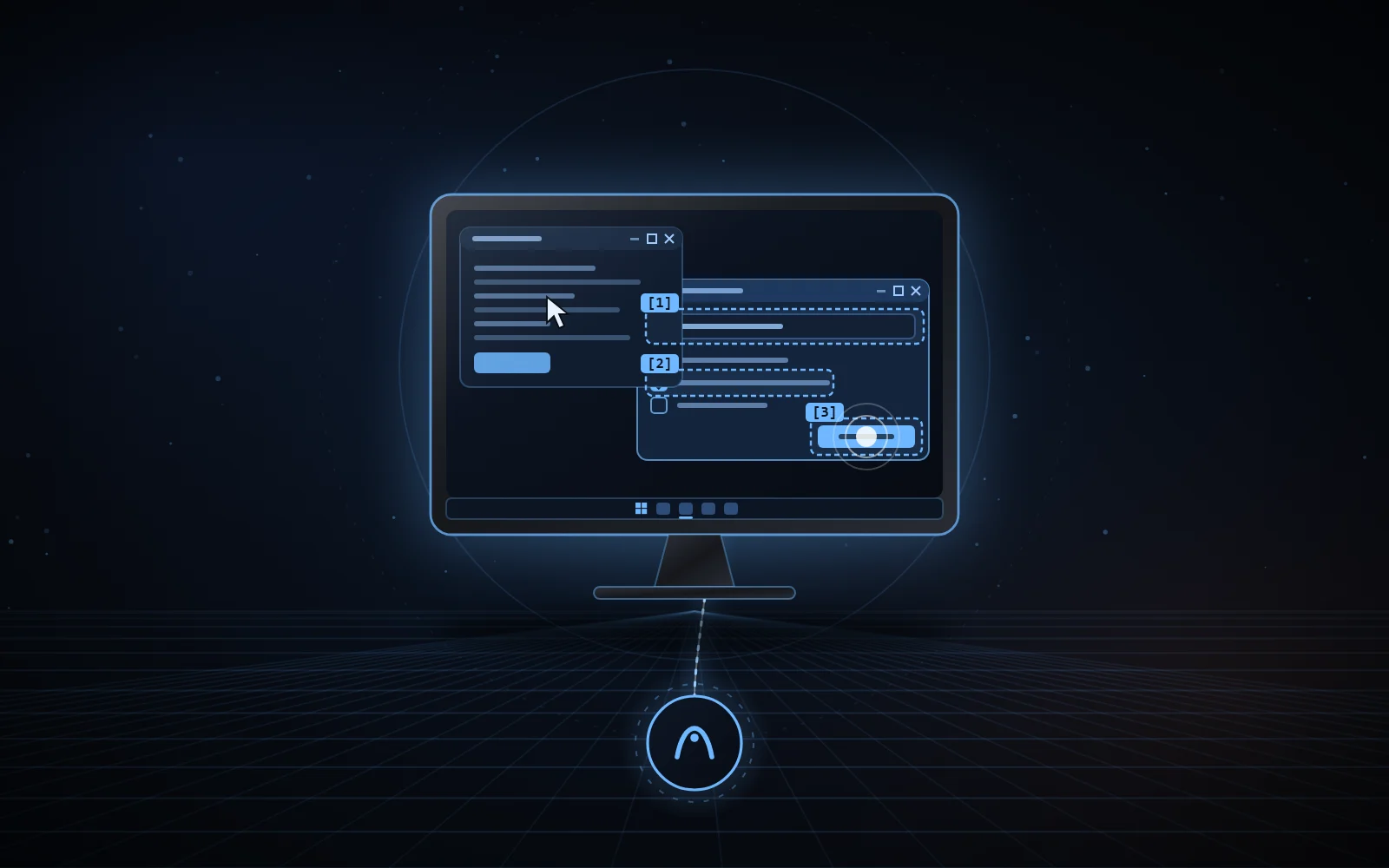
computer_look(window="Form")[1] edit “Name” = “”[2] button “Send”computer_act(steps=[…])type done, value read backclick “Send” confirm: true requiredrepeat same batch refused without a new look01 / WHY
Screenshot-and-click computer use moves the real cursor and brings windows to the front. This server acts in the background first, reads the effect back, and only falls back to the real mouse or keyboard when the step allows it (foreground=True).
It is built for a fast model: one look, then one batch of steps named by their label, and every reply says what to do next.
02 / WHAT IT DOES
Look, then act in one batch with label targets. The ten older tool names stay callable.
computer_list_windowsApplication windows, optionally grouped by application.
computer_lookOne line per element (role, name, value, states, position) and an image, without bringing the window forward.
computer_actSeveral steps in one call (click, typing, check box, list, menu, keys…), each read back.
computer_open_pathOpens a document, folder, program or shortcut; the opening is read back.
computer_close_windowCloses a window cleanly: UI Automation, then WM_CLOSE.
nextEvery reply states the next step in one line (✓ done, = already done, ~ effect not seen, ✗ failure) and attaches the window image when the effect was not read back.
repeatA batch identical to one sent less than 10 s earlier, without a new look, is refused.
foreground=TrueEven then, background first: a targeted point is mapped to the UI Automation element under it, covered windows included.
Win32 · WinFormsDirect messages to native controls, with their notifications; WinForms through UI Automation then messages.
WPF · UWP · ChromiumUI Automation only, read in one round trip; a truncated read is reported, never a silent empty list.
verifiedRead back in the application: value, state, selection, focused element, title, image. Never a success on “command sent” alone.
ClipboardSaved in all its formats and restored as it was; used only as a last resort for long typing.
Checks: ruff, Pyright and pytest offline; real validation on its own Win32, WinForms and WPF windows, shown without activation.
03 / SAFEGUARDS
The rules live in the tool itself, not only in the agent’s instructions.
Never the foreground window by default; an ambiguous title or label is refused with the list of candidates.
The target window is read back in the foreground right before every physical input and cursor move, otherwise nothing is sent.
Pay, buy, order, transfer money, send, publish, delete permanently, uninstall, format, reset, cancel a subscription, erase data or make a repository public need confirm: true, the Enter key included.
KeePass, KeePassXC, Bitwarden, 1Password, Dashlane, NordPass, RoboForm and LastPass are never looked at, captured or driven.
Sign-in screen, lock screen and UAC prompt: refused.
Confirmation is on by default; NEXUS_AGY_CONFIRM=off in the server environment turns it off entirely.
04 / ALONGSIDE OTHER AGENTS
Two file-based protocols shared by the NexusWindows editions and NexusBrowser. Any agent can implement them.
A shared file, held only while really using the mouse or the foreground, never for a background action. Windows releases it if the agent stops; a waiting agent gives up after a few seconds and says who holds it.
Ctrl+Alt+Shift+Esc blocks every desktop action for 2 minutes, for every agent; reads stay allowed. Deleting the file or changing the clock does not lift the stop.
Your physical input is read through Raw Input: the server waits for a pause before any real mouse or keyboard, and stops at the next checkpoint if you touch the keyboard or mouse.
05 / INSTALLATION
Requirements: Windows 10 or 11, PowerShell 7 and uv (installed by install.ps1 if missing). The Python environment, logs and screenshots live outside the clone; the server is then declared in Antigravity’s mcp_config.json.
pwsh -NoProfile -File install.ps1
Independent project, not affiliated with Microsoft or Google.
06 / THE NEXUS FAMILY

Local MCP server for Claude Desktop and Claude Code, on any plan that loads a local MCP server.
Discover the Claude edition
A layer that makes Codex’s Computer Use act in the background first on Windows.
Discover the Codex edition
Your real Chrome, driven by your AI agents in background tabs.
Discover NexusBrowser
A real Android phone, seen and driven by your agents over ADB.
Discover NexusAndroid07 / SOURCE CODE
The code, documentation and measurements are on GitHub, under the MIT licence.